Everyday protection
Pause and resume protection on a website
Choose a temporary site pause, understand the site switch, and restore protection afterward.
Quick answer
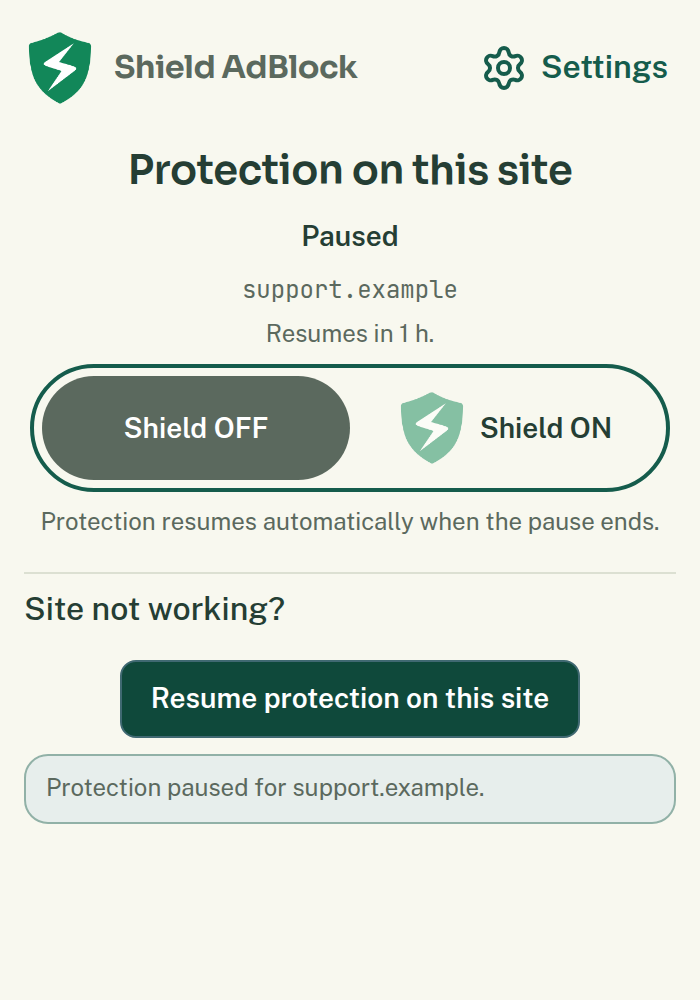
To test one website, use Pause protection on this site in Shield’s toolbar popup. Its separate duration choice defaults to 1 hour. You can choose 1 day or Off until I turn it on instead.
The large Protection on this site switch behaves differently: turning it off pauses protection on that website until you turn it on again. The site switch does not use the temporary pause duration. Check the website name and the resulting status before returning to the page.
Where to find it
Open the affected website, then open Shield AdBlock from the browser toolbar or extensions menu. The popup shows the current website, its site switch, and the separate pause action when available.
What to do
- Confirm that the popup names the website you want to test.
- Review Duration if you want a different duration from one hour.
- Choose Pause protection on this site.
- Wait for the success message.
- Reload the website yourself if the browser did not reload it.
- Repeat the action that was failing.
A full protection pause lets ads and tracking load on the covered site. It is useful for comparing a broken action with protection on and off, but it is broader than a permanent repair needs to be.
Pauses cover the saved hostname and its subdomains. A pause for example.com also covers shop.example.com. A pause for shop.example.com does not cover the parent or a sibling such as news.example.com.
What should happen
A timed pause should show that protection will resume automatically. An indefinite pause stays until you resume it. Existing page content may need a reload when protection resumes.
Pause ad hiding, under More for this site, is a different choice. It leaves ad and tracker request blocking unchanged and stays paused until you resume ad hiding. It does not inherit the one-hour duration.
Resume and check
Use the popup’s resume action or turn the site switch back on. Then reload and repeat your test. You can also open Settings → Websites → Paused Protection and choose Resume protection for the relevant entry.
If the site remains paused, review parent-domain entries in Websites. Another saved pause may still cover it. Review Ad Hiding Paused separately if the page still looks different after full protection resumes.
If that does not work
If pausing helped, follow website not working to try a narrower repair. If pausing made no difference, restore protection and keep that result for support. Turning off Protection everywhere in Settings affects all sites and is unnecessary for this comparison.
Related help
Contact support and share a report if you need more help. You can also find the support contact details.